Hide sensitive info before you share.
Redact screenshots, PDFs and text. Everything stays in your browser — nothing is uploaded.
Redact screenshots, PDFs and text. Everything stays in your browser — nothing is uploaded.
RedactPal hides sensitive information in screenshots, photos, PDFs and text before you share them. Paste or drop a file and it reads the text on your device — with OCR for images and scanned pages — highlights what looks sensitive, and covers it with solid black boxes. You check every box, drag to add your own, then copy, share or download the safe version. Nothing is uploaded: the page is blocked from talking to any other server, and it keeps working offline. RedactPal is free with no limits, no account, no ads and no tracking, and it is open source (MIT). It is a public-good project, not a trial for a paid plan.
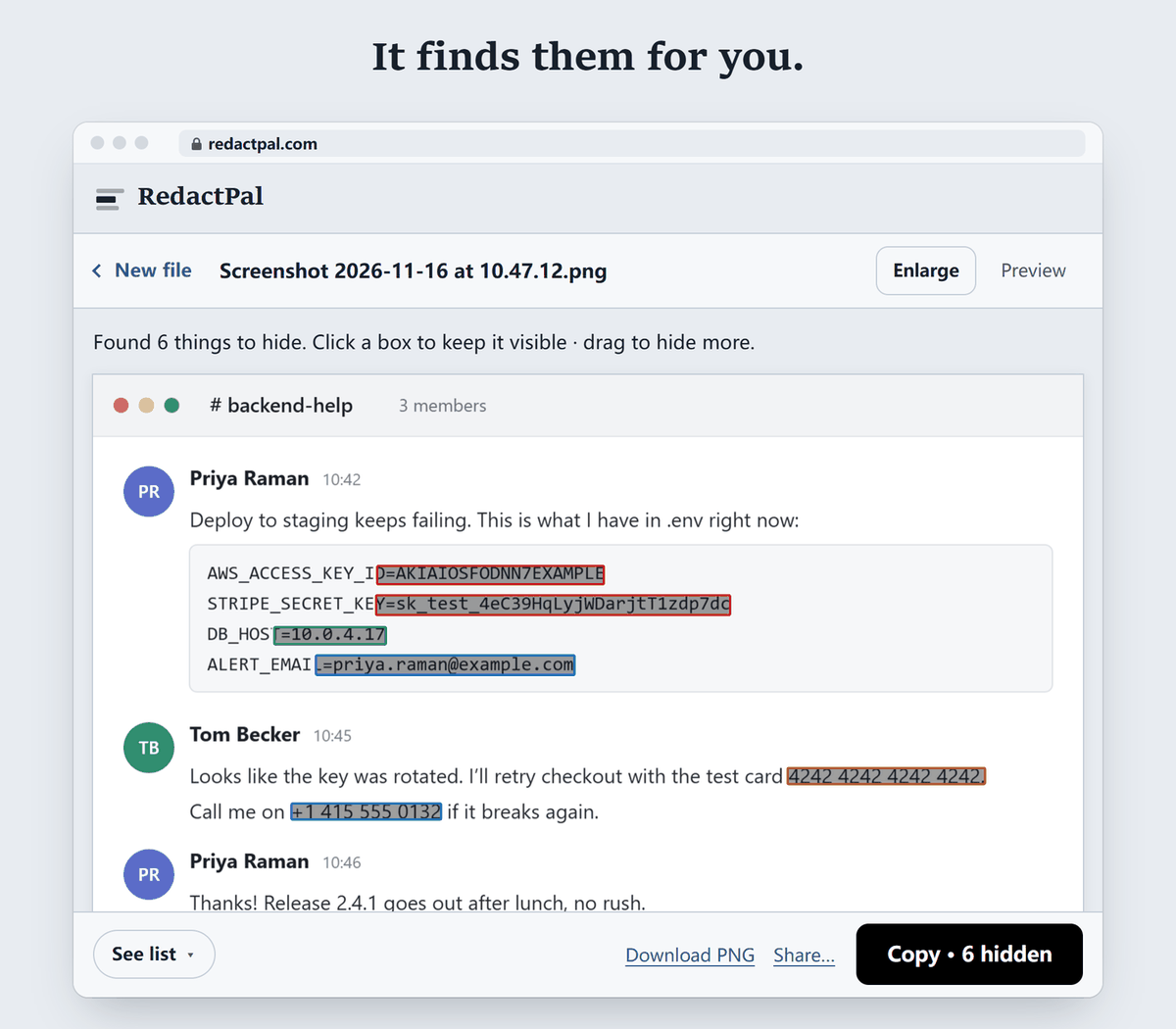
Email addresses, phone numbers, credit card numbers (Luhn-checked), IBANs, labelled bank account numbers, US routing numbers and UK sort codes, US Social Security numbers, IP and MAC addresses, passwords and secrets in config files and logs, JWTs, and API keys from services such as AWS, GitHub, Stripe, Slack and OpenAI. Detection is rule-based: known formats, checksums and key prefixes.
Drag a box over a name, an address or a project codename once, and RedactPal finds every other place it appears and offers to hide them all. You see every box before anything is shared, so you stay in control of exactly what leaves your device.
Blurred or pixelated text can sometimes be reconstructed. RedactPal only uses opaque boxes and rebuilds the export from pixels: images are re-encoded without location data, and PDF pages become images, so text under a box can’t be copied out.
You don't have to take our word for it. The test takes a minute.
connect-src 'self' blob: data:, so it can't connect to other servers. The full test, for any redaction tool shows what to look for.Open redactpal.com and paste the screenshot (Ctrl+V or ⌘V), drop it on the page, or tap “Choose a photo or PDF” on a phone. Emails, phone numbers, card numbers, API keys and other sensitive text are found and highlighted. Tap a highlight to keep it visible, drag over anything that was missed, then copy, share or save the image. The result has solid black boxes.
Drop the PDF on redactpal.com, check the highlighted items on every page, and download the redacted PDF. Each page is rebuilt from pixels, so text under a box can’t be copied out, and metadata such as author and title is removed. It’s free and needs no account.
No. RedactPal runs entirely in your browser — text recognition and detection happen on your device, and the page is blocked from connecting to other servers. After the first visit it even works offline. The code is open source, so anyone can check.
Blurred and pixelated text can often be reconstructed. RedactPal only uses solid, opaque boxes, and re-encodes the image so nothing of the original survives under them.
Email addresses, phone numbers, credit card numbers, IBANs, bank account and routing numbers, US Social Security numbers, IP addresses, passwords, JWTs and API keys from AWS, GitHub, GitLab, Slack, Stripe, OpenAI, Anthropic, Google and more. Names and addresses have no fixed format: draw a box over one once and RedactPal offers to hide it everywhere it appears.
Yes. Paste the text and copy the safe version — sensitive values become placeholders like [EMAIL_1]. When the AI replies, paste the reply back and RedactPal puts your real details back in.
Yes. Open redactpal.com in any mobile browser, pick a photo or PDF, and share the result. You can add it to your home screen, and on Android you can share a photo straight to RedactPal.
Yes. RedactPal is MIT-licensed and is just static files, so it can be hosted on an internal server with no backend. Files never leave the device.